
Five levers in Claude Code: a practical guide to CLAUDE.md, skills, hooks, MCP, and sub-agents
The question I hear most often from developers who have started using Claude Code seriously is not whether it can help them — it clearly can — but which features to reach for and when. There are five extensibility mechanisms available, and they pull in very different directions. Getting them wrong means either underusing the tool or adding complexity that buys you nothing. After spending considerable time building with all of them, here is the mental model I have settled on.
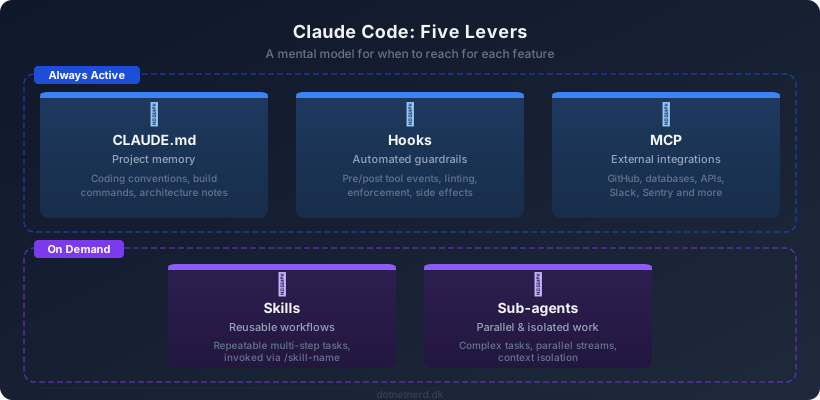
CLAUDE.md — what Claude knows about your project
Every project should have a CLAUDE.md at the root. This file is loaded at the start of every session and stays in context the whole time. Think of it as standing orders: your project structure, coding conventions, which commands to run to build and test, any architectural decisions worth remembering. If you find yourself repeatedly telling Claude the same thing at the start of a session — "we use Prettier with single quotes", "the entry point is src/main.ts", "never modify the generated files in /output" — that belongs in CLAUDE.md.
Keep it under 200 lines. Beyond that, adherence drops off. If your project is large enough to need more, split it using @path/to/file imports or put topic-specific rules in .claude/rules/. There is also CLAUDE.local.md for things that are personal to you and should not be committed — your local environment quirks, personal preferences, notes you are keeping while experimenting.
Reach for it when: you want Claude to consistently know something true about your project without having to say it every time.
Skills — workflows you run more than once
A skill is a reusable prompt wrapped in a SKILL.md file. You put it in .claude/skills/<name>/ for the current project, or ~/.claude/skills/<name>/ to make it available everywhere. Claude loads the description of every available skill into context, so it can invoke them automatically when the task matches — or you can trigger one explicitly with /skill-name.
The signal that you need a skill is repetition. If you have given Claude the same multi-step instructions two or three times — "when creating a commit, always check for secrets first, then run the linter, then format the message like this" — write it down as a skill once and stop repeating yourself. Skills also support $ARGUMENTS for parameterised invocation and can run shell commands for preprocessing before their instructions are sent to the model. If a skill is only meant to be triggered explicitly by you, not by Claude, set disable-model-invocation: true.
Reach for it when: you keep giving Claude the same instructions, or you want a documented, shareable workflow that the team can invoke consistently.
Hooks — things that should happen automatically
Hooks are shell commands (or HTTP calls, or even small LLM evaluations) that fire in response to events in the Claude Code lifecycle: before a tool runs, after it succeeds, when a session starts, when Claude finishes responding. The key property that makes them useful is that they are deterministic — they run a script, not a model, so you get consistent behaviour rather than "Claude usually does this".
The most immediately useful hook events are PreToolUse and PostToolUse. Before a file write you can run a security scan. After an edit you can run your formatter or linter automatically. Exit code 2 from a PreToolUse hook blocks the tool call entirely — useful for enforcing policies like "never touch files in /migrations without confirmation". At exit 0, anything written to stdout gets injected into Claude's context, so you can feed in information dynamically.
Hooks are configured in settings.json under a "hooks" key, using regex matchers to filter which tool or event they apply to. They feel low-level at first but they are the right place for anything that needs to happen reliably — not just when Claude remembers.
Reach for it when: you want automated quality gates, side effects, or enforcement that should fire every time — not just when you ask for it.
MCP — giving Claude eyes beyond the filesystem
Model Context Protocol is an open standard for connecting Claude to external systems. You add an MCP server and Claude gains new tools it can call: query a database, read a GitHub issue, fetch a Sentry error, look up a Figma design. The server can be remote (HTTP) or a local process (stdio). Project-level servers go in .mcp.json and get checked into source control so the whole team shares them. Personal servers live in ~/.claude.json.
The practical test for whether you need MCP is whether Claude is currently asking you to copy-paste things from other systems into the chat. If you are fetching a JIRA ticket and pasting the description, or copying a database query result, or manually giving Claude the contents of a Slack thread — that friction is exactly what MCP is designed to remove. There is a large and growing ecosystem of ready-made servers covering most of the usual suspects: GitHub, Linear, Notion, Postgres, Sentry, Stripe.
Reach for it when: Claude needs to read from or act on systems outside your codebase, and you are tired of being the copy-paste bridge.
Sub-agents — when one context window is not enough
Sub-agents are isolated Claude instances that run in their own context window and report back a summary. The built-in types cover most common cases: Explore for fast read-only codebase research, Plan for working out an implementation approach, and general-purpose for anything more involved. You can also define your own in .claude/agents/.
The two situations where sub-agents earn their place are parallelism and context protection. If a task has genuinely independent workstreams — research the API, write the tests, check the documentation — running them as concurrent background agents is dramatically faster than doing them in sequence. The other case is keeping your main conversation clean: deep research or large-scale exploration can consume context quickly, and delegating it to a sub-agent means the results come back as a summary rather than a wall of intermediate output. Sub-agents can also run in an isolated git worktree if you want them to make speculative changes without touching your working tree.
Reach for it when: the task is too large for one context window, has parallel workstreams, or involves exploration that would pollute the main conversation.
The short version
If you want a one-paragraph version: start every project with a CLAUDE.md that captures what Claude should always know. When you catch yourself repeating the same instructions, write a skill. When you want reliable automation that does not depend on Claude remembering to do it, write a hook. When Claude needs to talk to systems outside your repo, add an MCP server. And when a task is complex enough that it would benefit from parallelism or isolation, reach for a sub-agent. Used together these features move Claude Code from a smart assistant you chat with into infrastructure you can actually depend on.